
- Trail:
- Laurel Point (Raccoon Mountain)
- Status:
- Minor Issue / Yellow
-
Issue status:
- Condition:
- Ideal - Hero dirt! Not wet but not dry, moisture in soil.
- Reporter Primary Activity:
- E-Bike
Description:
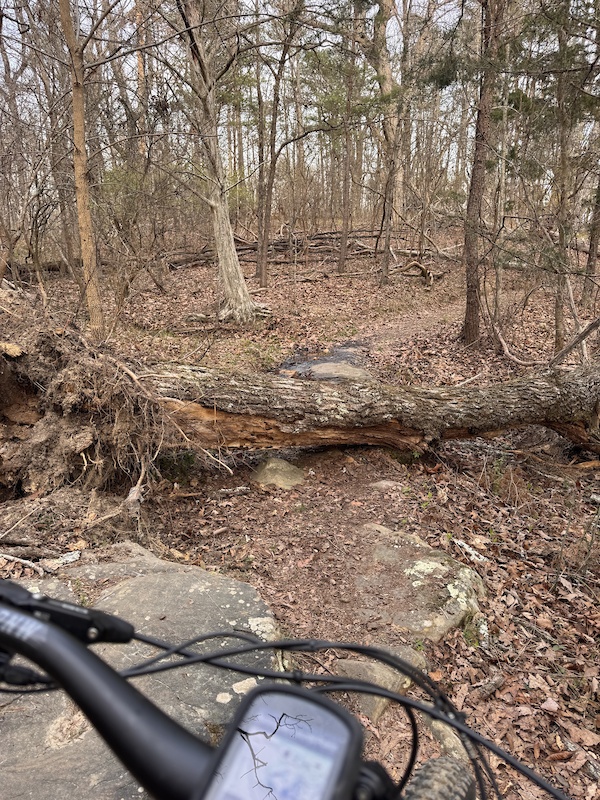
Some trees down—biggest one in photo with gps location
This report was generated from the activity log.
Local Weather During Report
- Summary
MostlyClear - Temperature
17° (11°/26°) - Precip
0 mm/h - Wind
2.49 km/h - Cloud Cover
28% - Humidity
0.67
Previous Reports
9 Comments

- + 2
Thank you for reporting!
Sometimes when later connected to WiFi I manually sync by going to "Settings> Manual Sync> Upload Queued Ridelogs, Photos and Reports" then photos and GPS will upload. Also sometimes when using my phone to create a report GPS mapping will only appear in the report if I take the photo thru the app rather than choosing the photo from my phone's photo library.
Sometimes non of that works and the problem is within the app. Thanks again for taking time to report!
Sometimes when later connected to WiFi I manually sync by going to "Settings> Manual Sync> Upload Queued Ridelogs, Photos and Reports" then photos and GPS will upload. Also sometimes when using my phone to create a report GPS mapping will only appear in the report if I take the photo thru the app rather than choosing the photo from my phone's photo library.
Sometimes non of that works and the problem is within the app. Thanks again for taking time to report!
- + 1
@maczz: thanks—I attached the photo more directly this time—hopefully it’s visible and shows the gps like in my ride log. Appreciate all the work on these awesome trails!
- + 1
@maczz: That's odd--it shows exactly where i took the photo on my ridelog. Anyway, here's the GPS coordinates: Latitude: 35° 2' 36.06" N; Longitude: 85° 25' 6.198" W or in this format: 35.043350, -85.418388
- + 2
@trailadventurer: Appreciate that.
It's likely the app causing the problem. It wouldn't be the first time. Thanks again!
It's likely the app causing the problem. It wouldn't be the first time. Thanks again!


Sometimes when later connected to WiFi I manually sync by going to "Settings> Manual Sync> Upload Queued Ridelogs, Photos and Reports" then photos and GPS will upload. Also sometimes when using my phone to create a report GPS mapping will only appear in the report if I take the photo thru the app rather than choosing the photo from my phone's photo library.
Sometimes non of that works and the problem is within the app. Thanks again for taking time to report!